

Radio Button
Radio button questions allow respondents to select a single predefined answer from a list of options. This format is particularly effective for assessing maturity levels, compliance status, and process adherence.
Types of Radio Button Question Models
There are three primary models for structuring radio button questions, each with distinct advantages:
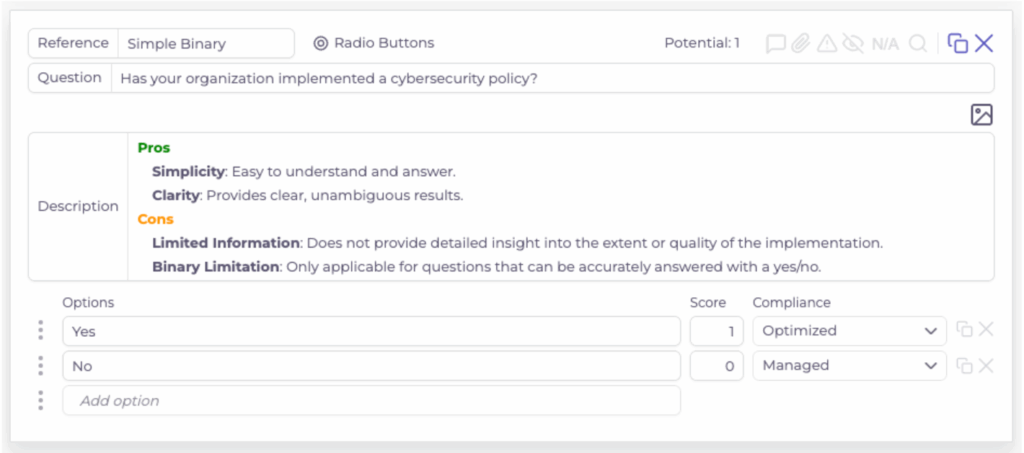
1. Simple Binary Options
Example Question:
“Has your organization implemented a cybersecurity policy?”
✅ Pros:
- Simplicity: Easy to understand and answer.
- Clarity: Provides a definitive response (Yes/No).
❌ Cons:
- Limited Insight: Does not capture the extent or quality of implementation.
- Binary Limitation: Only suitable for questions with a clear yes/no answer.
When to Use:
- When a straightforward decision is needed (e.g., “Do you have an incident response plan?”).
- When detailed maturity levels are not required.
2. Tiered Maturity Aligned Options
Example Question:
“How often does your team follow documented processes?”
✅ Pros:
- Ease of Use: Quick to build and respond to.
- Range of Responses: Allows for more nuanced maturity levels.
❌ Cons:
- Subjectivity: Responses may be interpreted differently by different users.
- Optimism Bias: Respondents may overestimate their performance.
When to Use:
- When measuring frequency, adherence, or progressive improvements.
- When looking for trends rather than absolute compliance.
Typical Scale:
- In no cases.
- In a few cases.
- In about half the cases.
- In most cases.
- In all cases.

3. Tiered Descriptive Maturity Aligned Options
Example Question:
“Have Executive Management signed off the documents?”
✅ Pros:
- Clarity: Reduces ambiguity with explicit descriptions.
- Detailed Insight: Provides a structured understanding of the maturity level.
- Accuracy: Minimizes subjectivity for more reliable responses.
❌ Cons:
- Complexity: More time-consuming to create and respond to.
- Requires Careful Wording: Must ensure descriptions are clear and relevant.
When to Use:
- When precise maturity levels must be measured.
- When reducing interpretation errors is critical.
Example Scale with Descriptions:
- Documents are signed off and reviewed annually. (Optimized)
- Documents were signed off more than a year ago. (Managed)
- We use generic documents and only special cases go through management for sign-off. (Defined)
- Documents and/or process is being defined. (Emerging)
- Nothing is ever signed off. (Initial)
This approach ensures that respondents understand the exact difference between maturity levels.
Scoring & Compliance in Radio Questions
Each answer is associated with a score and compliance level, helping measure maturity and identify gaps.
Gap Analysis Calculation:
Potential Score (highest possible) – Selected Answer Score = Gap/Opportunity
For example:
- Potential = 5
- Selected Answer Score = 4
- Gap = 1 (Opportunity for Improvement)
This logic highlights areas where improvements can be made.

How to Use Radio Button Questions in Rapid Assurance
- Select “Radio Button” as the question type.
- Enter your question in the designated field.
- Define the options based on the selected model.
- Assign Scores & Compliance Levels for maturity tracking.
Advanced Features
- Drag & Rearrange: Options can be reorganized easily.
- Predefined Templates: Standard options come with pre-set scores and compliance levels, which can be customized.
- Clone & Save Favorites: If a question works well, duplicate it within the assessment or save it for future use.